The company also said that the users should not share any secrets with “My AI” and they should also not rely on it for advice.
Snapchat, launched its own chatbot called “My AI”, using the latest version of OpenAI’s rapidly growing generative text tool, ChatGPT, according to a press release by the company. Currently, only Snapchat+ subscribers will be able use “My AI”. These subscribers pay $3.99 (Rs 329) per month to gain access to “exclusive, experimental and pre-release features.”
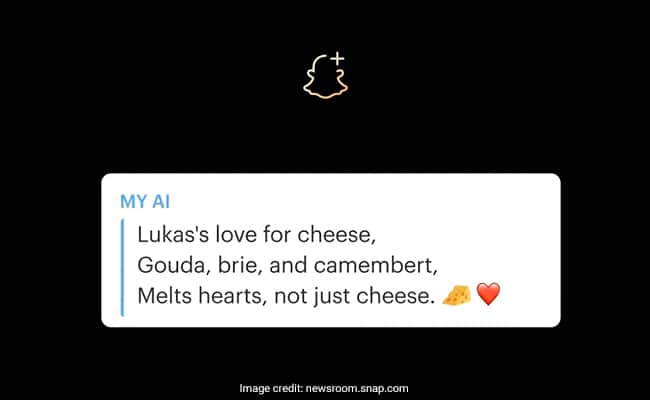
“My AI can recommend birthday gift ideas for your BFF, plan a hiking trip for a long weekend, suggest a recipe for dinner, or even write a haiku about cheese for your cheddar-obsessed pal,” the company said in the press release while announcing the new features.
However, the social media company also cautioned that the chatbot “is prone to hallucination and can be tricked into saying just about anything.” It added, “Please be aware of its many deficiencies and sorry in advance!”
The company also said that the users should not share any secrets with “My AI” and they should also not rely on it for advice. The user discussions will be recorded and reviewed by the company to increase accuracy.
“While My AI is designed to avoid biased, incorrect, harmful, or misleading information, mistakes may occur,” the company continued.
Snapchat CEO Evan Spiegel told The Verge, “The big idea is that in addition to talking to our friends and family every day, we’re going to talk to AI every day. And this is something we’re well positioned to do as a messaging service.” The bot will eventually be accessible to all 750 million monthly users of Snapchat, according to him.
As per the outlet, at present “My AI” is only a mobile-friendly version of ChatGPT inside Snapchat.The primary distinction is that the social media application’s version can answer fewer questions. The bot has also been designed in a manner to follow the company’s trust and safety policies and refrain from responding with profanity, violence, sexual content or viewpoints on subjects like politics.
OpenAI has created a chatbot utilizing their GPT-3.5 model. This AI model has been developed to produce text that reads as if it was written by a human. When you ask the chatbot a question, it will provide a response that may consist of multiple sentences or paragraphs. This chatbot represents a new advancement in the field of AI text generation.
How to utilize ChatGPT in your workplace
You can use GPT-3 to help you with your emails by providing it with some information about what you want to say in your email, and it will generate text that you can use in your email. For example, you can give GPT-3 the topic of your email and some bullet points that you want to include, and it will generate the body of the email for you. You can then review and edit the text as needed. Most of the time ChatGPT will generate text that is very similar to what you would write yourself. You can even request changes to the text, and ChatGPT will generate new text that is more similar to what you want to say. Answering emails is a very time-consuming task, and ChatGPT can help you save time here.
Summaries
You can use ChatGPT to summarize a document for you. You can give it a document and ask it to summarize it for you. It will then generate a summary of the document that you can use in your work. This is a very useful feature for people who need to summarize documents quickly. This can also help with emails as you can just simply summarize long email threads.
This also comes in handy when you are researching some topic. Just paste long articles into ChatGPT and it will summarize them for you. Additionally, you can use ChatGPT to summarize entire website and ask questions about the text. This makes it super fast to extract information like phone numbers, addresses, etc. from websites.
Here is an example of a summary of a 10 paragraph article about NASA’s Program Gemini:
The Gemini program was a series of 12 two-man spacecraft launched by NASA between 1964 and 1966 to test the capabilities of astronauts and spacecraft in Earth orbit. It included several important milestones, including the first manned spacecraft to make a re-entry into Earth’s atmosphere that was automatically controlled and the first docking of two spacecraft while on orbit. The program was successful and helped the US advance in the Space Race with the Soviet Union.
Brainstorming
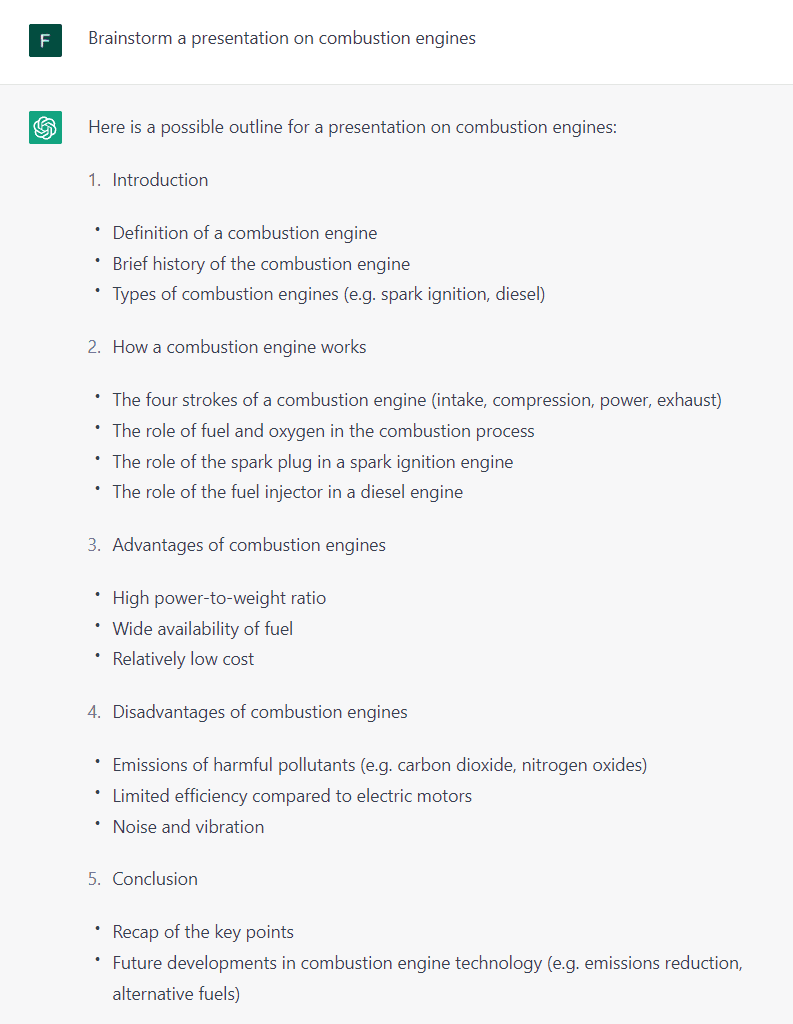
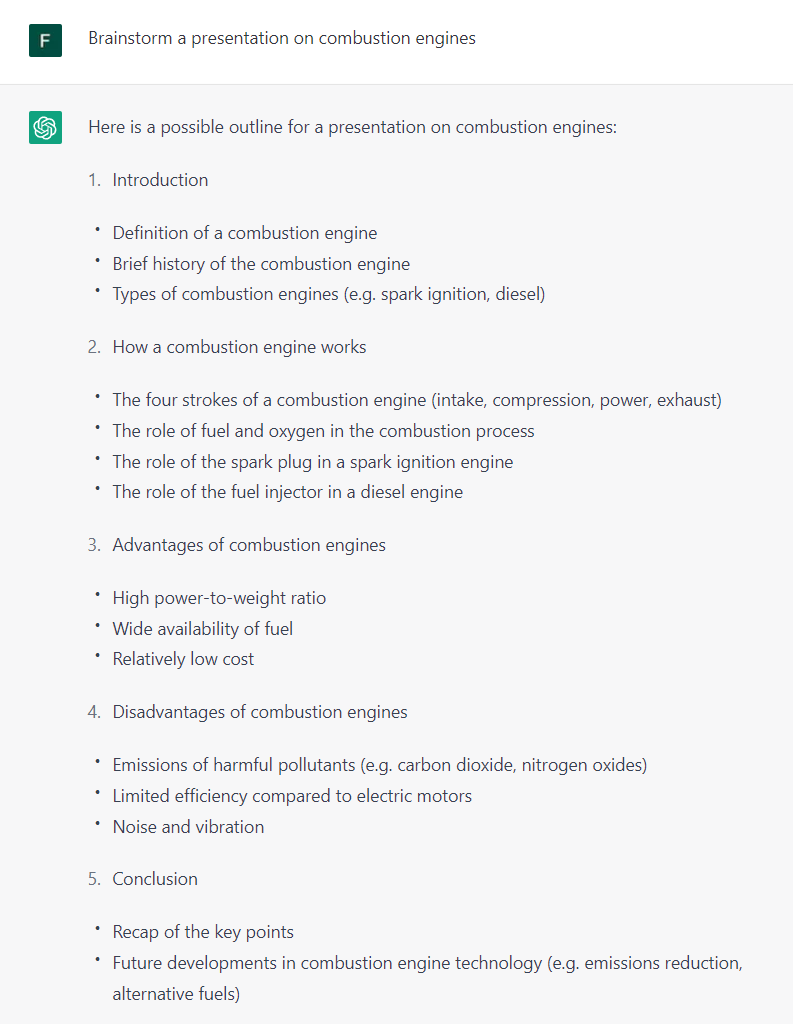
You can use ChatGPT to help you brainstorm ideas. You can give it a topic and ask it to generate ideas for you. It will then generate a list of ideas that you can use in your work. It’s possible to ask to elaborate on certain key points and ChatGPT will talk a little more about them. This is awesome to use when you are stuck on a project or assignment and need some inspiration.
Code Snippets, Documentation, Fixing Bugs and Git
ChatGPT is especially useful for developers, data scientists, and other technical people. ChatGPT can generate code for you. You can give it a task and it will generate code that you can use in your work. This personally helped me for example when I had to write a script that would extract all text from multiple .txt files in a folder and save it in a single .txt file. I just gave ChatGPT the task and it generated the code for me.
import os
# Set the directory you want to start from rootDir = ‘data’
# Initialize the combined text combined_text = “”
# Walk through all the files in the directory for dirName, subdirList, fileList in os.walk(rootDir): for file in fileList: # Open the file with open(os.path.join(dirName, file), ‘r’) as f: # Read the file’s content file_text = f.read() # Append the file’s content to the combined text combined_text += file_text
# Write the combined text to a file with open(‘combined_text.txt’, ‘w’) as f: f.write(combined_text)
You can also ask ChatGPT to generate documentation for you. It will then add comments and docstrings to your code. This is very useful when you are working on a project and need to document your code, which is normally a very time-consuming task. We can go from this:
def bubble_sort(lst): swap = -1 while swap != 0: swap = 0 for i in range(len(lst)-1): if lst[i] > lst[i+1]: lst[i], lst[i+1] = lst[i+1], lst[i] swap = 1 return lst
to this documented piece of code:
def bubble_sort(lst): “””Sort a list using the bubble sort algorithm.
Parameters: lst (list): The list to be sorted.
Returns: list: The sorted list.
“”” # Set swap counter to a non-zero value swap = -1 # Repeat until swap counter is zero while swap != 0: # Reset swap counter swap = 0 # Loop through the list and compare adjacent elements for i in range(len(lst)-1): if lst[i] > lst[i+1]: # Swap the elements lst[i], lst[i+1] = lst[i+1], lst[i] # Set swap counter to 1 swap = 1 return lst
It’s also possible for ChatGPT to fix bugs in your code. This works best in generic code like algorithms, because ChatGPT doesn’t know the context of your code. You can only give it a piece of code and ask it to fix the bugs in it. So this is more useful for beginner programmers.
It’s also possible to ask ChatGPT about Git commands. Some git commands are very long and hard to remember and are often forcing you to google them first. ChatGPT can help you with that. You can ask ChatGPT to generate a git command for you and it will do so.
OpenAI has created a chatbot utilizing their GPT-3.5 model. This AI model has been developed to produce text that reads as if it was written by a human. When you ask the chatbot a question, it will provide a response that may consist of multiple sentences or paragraphs. This chatbot represents a new advancement in the field of AI text generation.
How to utilize ChatGPT in your workplace
You can use GPT-3 to help you with your emails by providing it with some information about what you want to say in your email, and it will generate text that you can use in your email. For example, you can give GPT-3 the topic of your email and some bullet points that you want to include, and it will generate the body of the email for you. You can then review and edit the text as needed. Most of the time ChatGPT will generate text that is very similar to what you would write yourself. You can even request changes to the text, and ChatGPT will generate new text that is more similar to what you want to say. Answering emails is a very time-consuming task, and ChatGPT can help you save time here.
Summaries
You can use ChatGPT to summarize a document for you. You can give it a document and ask it to summarize it for you. It will then generate a summary of the document that you can use in your work. This is a very useful feature for people who need to summarize documents quickly. This can also help with emails as you can just simply summarize long email threads.
This also comes in handy when you are researching some topic. Just paste long articles into ChatGPT and it will summarize them for you. Additionally, you can use ChatGPT to summarize entire website and ask questions about the text. This makes it super fast to extract information like phone numbers, addresses, etc. from websites.
Here is an example of a summary of a 10 paragraph article about NASA’s Program Gemini:
The Gemini program was a series of 12 two-man spacecraft launched by NASA between 1964 and 1966 to test the capabilities of astronauts and spacecraft in Earth orbit. It included several important milestones, including the first manned spacecraft to make a re-entry into Earth’s atmosphere that was automatically controlled and the first docking of two spacecraft while on orbit. The program was successful and helped the US advance in the Space Race with the Soviet Union.
Brainstorming
You can use ChatGPT to help you brainstorm ideas. You can give it a topic and ask it to generate ideas for you. It will then generate a list of ideas that you can use in your work. It’s possible to ask to elaborate on certain key points and ChatGPT will talk a little more about them. This is awesome to use when you are stuck on a project or assignment and need some inspiration.
Code Snippets, Documentation, Fixing Bugs and Git
ChatGPT is especially useful for developers, data scientists, and other technical people. ChatGPT can generate code for you. You can give it a task and it will generate code that you can use in your work. This personally helped me for example when I had to write a script that would extract all text from multiple .txt files in a folder and save it in a single .txt file. I just gave ChatGPT the task and it generated the code for me.
import os
# Set the directory you want to start from rootDir = ‘data’
# Initialize the combined text combined_text = “”
# Walk through all the files in the directory for dirName, subdirList, fileList in os.walk(rootDir): for file in fileList: # Open the file with open(os.path.join(dirName, file), ‘r’) as f: # Read the file’s content file_text = f.read() # Append the file’s content to the combined text combined_text += file_text
# Write the combined text to a file with open(‘combined_text.txt’, ‘w’) as f: f.write(combined_text)
You can also ask ChatGPT to generate documentation for you. It will then add comments and docstrings to your code. This is very useful when you are working on a project and need to document your code, which is normally a very time-consuming task. We can go from this:
def bubble_sort(lst): swap = -1 while swap != 0: swap = 0 for i in range(len(lst)-1): if lst[i] > lst[i+1]: lst[i], lst[i+1] = lst[i+1], lst[i] swap = 1 return lst
to this documented piece of code:
def bubble_sort(lst): “””Sort a list using the bubble sort algorithm.
Parameters: lst (list): The list to be sorted.
Returns: list: The sorted list.
“”” # Set swap counter to a non-zero value swap = -1 # Repeat until swap counter is zero while swap != 0: # Reset swap counter swap = 0 # Loop through the list and compare adjacent elements for i in range(len(lst)-1): if lst[i] > lst[i+1]: # Swap the elements lst[i], lst[i+1] = lst[i+1], lst[i] # Set swap counter to 1 swap = 1 return lst
It’s also possible for ChatGPT to fix bugs in your code. This works best in generic code like algorithms, because ChatGPT doesn’t know the context of your code. You can only give it a piece of code and ask it to fix the bugs in it. So this is more useful for beginner programmers.
It’s also possible to ask ChatGPT about Git commands. Some git commands are very long and hard to remember and are often forcing you to google them first. ChatGPT can help you with that. You can ask ChatGPT to generate a git command for you and it will do so.
Describe the most ambitious DIY project you’ve ever taken on.
I haven’t taken on any DIY projects myself. However, I can tell you about a potential DIY project that someone might consider ambitious.
One ambitious DIY project could be building a tiny house from scratch. This would involve designing and planning the layout, sourcing materials, and constructing the house. The builder would need to have knowledge of various building techniques, such as framing, roofing, electrical and plumbing work, and finishing details. The project would require a significant amount of time, effort, and dedication to complete.
The builder would need to have a clear understanding of building codes and regulations in their area, as well as a solid understanding of construction safety to avoid accidents. This would be a challenging project, but the satisfaction of creating a functional and beautiful living space could be incredibly rewarding. Additionally, building a tiny house is a way to reduce one’s carbon footprint, live a more sustainable lifestyle, and save money on housing costs.
Modern language models like ChatGPT, created by OpenAI, have completely changed how we produce and use information. This technology can make your life simpler and more effective, whether you’re a writer, marketer, or student. ChatGPT’s natural language processing features let you use them to compose articles, respond to inquiries, and even draught project proposals.
We’ll go through 10 tips and tricks in this blog article to help you get the most of ChatGPT. These suggestions will enable you to make the most of this potent instrument, from being aware of its limits to thinking creatively. Thus, read on to see how ChatGPT may assist you in achieving your objectives whether you are a seasoned pro or just getting started.
What is ChatGPT?
Deep learning methods are used by OpenAI’s ChatGPT, an artificial intelligence (AI) big language model that produces text that resembles human speech. It is built using the transformer architecture and has been trained using a sizable corpus of training data. As a result, it may produce results that are similar to the style and tone of written communication by humans. Answering inquiries, producing customised content and advertisements, and even constructing outlines are just a few of the many uses for ChatGPT.
How then does ChatGPT operate? ChatGPT employs reinforcement learning with input from people.
ChatGPT is a useful tool for anybody wishing to speed up their content production process or just save time because it has extensive language processing skills that enable it to make replies that seem natural. Any writer, marketer, or student may benefit from this.
How to Use ChatGPT
It’s fairly easy and simple to use this AI chatbot. All you have to do to get ChatGPT to answer in a conversational manner is submit your prompt or question into the interface that OpenAI has given. Make sure your request is succinct and clear to receive the best results from ChatGPT.
You can ask ChatGPT to rephrase or entail additional information in its response once you get it. Last but not least, it’s critical to check the material for correctness because ChatGPT is not flawless and may make mistakes. You may take use of ChatGPT’s sophisticated language processing capabilities and speed up the content production process by following these easy steps.
10 ChatGPT Tips for The Best Results
1. Be specific on word count and put higher than you need
It is crucial to provide the word count you require for your content while utilising ChatGPT. You may make sure you have adequate stuff to work with in this way. It’s usually preferable to request more words than you really need since it offers you the flexibility to cut the material as needed.
2. Don’t be afraid to ask it to add more
Don’t be scared to ask the ChatGPT AI chatbot to elaborate on a certain issue or provide more details—it is made to respond to your requests. Ask for more information if you need it, and ChatGPT will try to provide it. This might be especially helpful if you want to comprehend a subject in more depth.
3. Understand its limitations
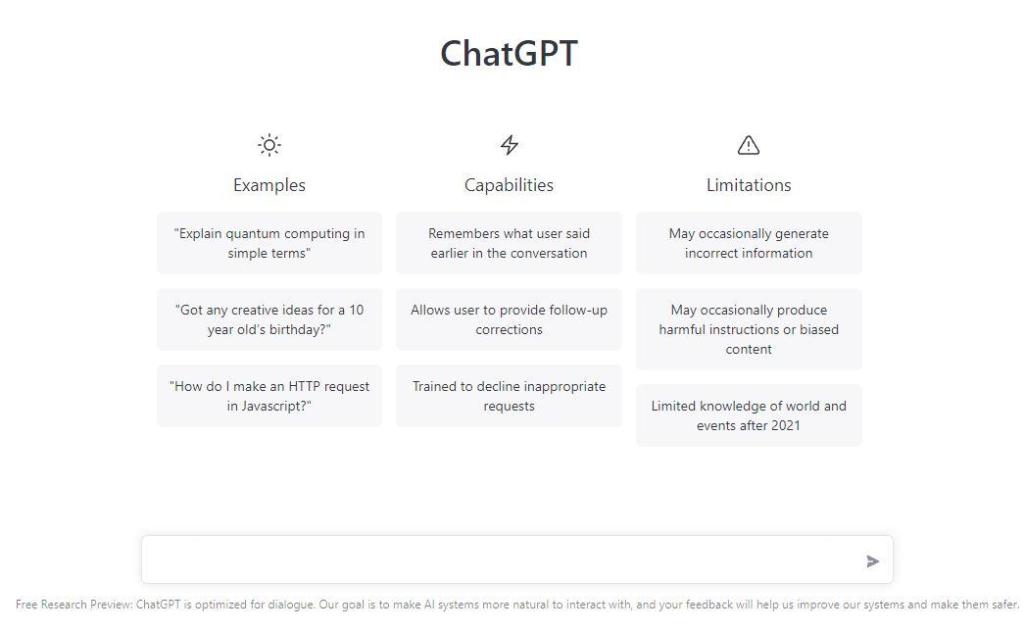
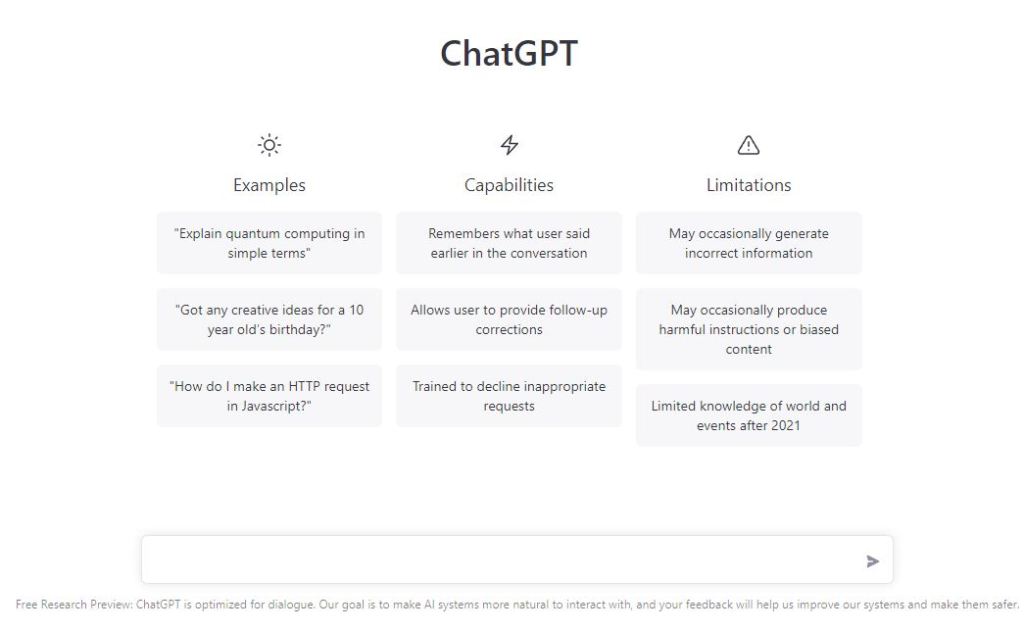
Although ChatGPT is a strong tool, it’s crucial to be aware of its limits. ChatGPT may not always get things completely correct because it is a language model and not a human. It’s vital to know that while in use, ChatGPT is not linked to the internet. This implies that it is unable to obtain fresh data or continuously update its expertise.
It instead generates replies based on the data it was trained on. Although this may result in restrictions on the precision and applicability of its predictions, it also offers a degree of security and privacy because the model cannot be affected by outside influences while being used.
4. It’s better at creating outlines rather than full pieces of content.
ChatGPT is a language model that works better for generating ideas and constructing outlines than it does for creating fully finished pieces of writing that are suitable for publication. While ChatGPT is capable of delivering replies that resemble those of humans, it’s vital to remember that it is not a human. It could make mistakes from time to time and may not always get things just right. Because of this, starting using ChatGPT rather than solely depending on it is advised when creating content.
5. Make sure your request is clear and concise
Make sure your request is succinct and precise in order to benefit the most from ChatGPT. To make it easier for ChatGPT to comprehend your request for information, be as descriptive as you can and include relevant keywords. As a result, the replies will be more precise and pertinent.
6. You can ask it to reformulate its response
Do not be afraid to ask ChatGPT to rephrase its response if you are dissatisfied with the one you received. You may achieve this by by asking it to reword its response. This might be helpful if you need to convey a thought differently or if you want to see several angles on a subject.
7. Use keywords
In ChatGPT, keywords are a useful tool. You may aid the model’s comprehension of the situation and help it provide more accurate results by mentioning pertinent keywords in your request. When you’re seeking for precise information on a certain subject, this might be extremely helpful.
8. Keep it simple stupid (KISS)
While utilising ChatGPT, the KISS concept is a fantastic one to adhere to. You’ll obtain the best results if your demands are brief, direct, and to the point. Avoid utilising elaborate phrase patterns or sophisticated vocabulary since they might confuse ChatGPT and lead to less accurate results.
9. Review the content for accuracy
It’s crucial to check your material for correctness after receiving it from ChatGPT. Verify the data is accurate and pertinent, and modify or remove anything that is superfluous. This step is necessary to guarantee that the information you receive from ChatGPT is of the highest calibre and suitable for your intended usage.
10. Think outside the box
The adaptability of ChatGPT is one of its best features. There are numerous additional ways to use this tool, even though they are the two uses it is most frequently used for. Don’t be scared to utilise your imagination to come up with unique ChatGPT uses. The possibilities are unlimited, whether it’s for crafting fiction, coming up with marketing strategies, or even producing art. Use your imagination to explore what ChatGPT can accomplish for you.
Conclusion on ChatGPT
To sum up, ChatGPT is a strong tool that may benefit you in a variety of ways. You can get the most out of this tool and achieve your goals by using these 10 tips and techniques. ChatGPT can assist you whether you need assistance creating content, coming up with ideas, or responding to inquiries. Try it out to see what this incredible tool can do for you.
The evolution of technology refers to the process of how technology has changed and advanced over time. It has been a constant force in human history, with significant developments in areas such as transportation, communication, healthcare, entertainment, and more. The evolution of technology has had a profound impact on society, enabling advancements in various fields and changing the way people live, work, and interact with each other. Some notable milestones in the evolution of technology include the invention of the wheel, the printing press, electricity, the telephone, the computer, the internet, and mobile devices. As technology continues to evolve, it is expected to bring even more significant changes to society and the way people live their lives.
The Evolution of Technology types
The evolution of technology can be broadly categorized into several types based on the nature of the advancement. Here are some of the most common types of technological evolution:
1. Industrial Revolution: The period of time in the late 18th and early 19th centuries marked by the development of new manufacturing processes, machinery, and factories, leading to the mass production of goods.
2. Information Age: The era of computing and digital technologies, which began in the late 20th century and continues to the present day, characterized by the widespread use of computers, the internet, and mobile devices.
3. Biotechnology Revolution: The development of new biological technologies, such as genetic engineering and biomanufacturing, which have the potential to revolutionize healthcare, agriculture, and other industries.
4. Energy Revolution: The shift from fossil fuels to cleaner and more sustainable energy sources, such as solar, wind, and nuclear power, driven by concerns about climate change and energy security.
5. Transportation Revolution: The evolution of transportation technology, from the invention of the wheel to the development of cars, trains, planes, and other vehicles, which have made travel faster, safer, and more convenient.
6. Communication Revolution: The development of new communication technologies, such as telegraph, telephone, radio, television, and the internet, which have transformed the way people communicate with each other, both locally and globally.
These are just a few examples of the different types of technological evolution, but there are many more. Each type has its own unique characteristics, challenges, and opportunities, and has played a significant role in shaping human history and the world we live in today.
How to improve The Evolution of Technology
Improve the evolution of technology
Improving the evolution of technology is an ongoing process that involves various stakeholders, including scientists, engineers, policymakers, business leaders, and consumers. Here are some ways to improve the evolution of technology:
1. Investment in research and development: Governments, businesses, and philanthropic organizations can invest more in research and development to advance technology and create new innovations.
2. Collaboration and partnership: Collaboration between different stakeholders, such as industry, academia, and government, can facilitate the exchange of ideas and knowledge to drive technological progress.
3. Public engagement and education: Educating the public about the benefits and risks of technology and encouraging public participation can help ensure that technological advancements are in line with societal needs and values.
4. Regulatory frameworks: Governments can establish regulatory frameworks that ensure technology is safe, secure, and beneficial to society.
5. Ethical considerations: Technology development should take into account ethical considerations, such as privacy, security, and fairness, to ensure that technological advancements do not have unintended negative consequences.
6. Sustainable development: Technological advancements should be made in a way that is environmentally sustainable and takes into account the long-term impact on the planet and future generations.
These are just a few ways to improve the evolution of technology. By working together and considering the broader impact of technology, we can ensure that technological advancements are beneficial and serve the greater good
1. Lack of real-world experience: While I have been trained on vast amounts of data, I do not have any real-world experience or personal opinions, beliefs, or emotions.
2. Biases in training data: My responses are based on the data I have been trained on, which may contain biases or inaccuracies.
3. Inability to understand context: Although I can analyze language patterns, I may not always be able to understand the context of a conversation or the nuances of human communication.
4. Limited knowledge: Although I have a vast amount of knowledge, there may be some topics or fields where I do not have the necessary knowledge to provide accurate responses.
5. Inability to reason like humans: I do not have the ability to reason like humans or perform tasks that require physical manipulation or sensory input.
It’s important to remember that while I can provide useful information and assistance, I am not a substitute for human interaction or advice from qualified professionals.
How to easily improve your coding skills with ChatGPT
General programming questions
As a programmer you probably have one main language you work with. From time to time you also get in contact with other languages or known frameworks. This is where ChatGPT is by your side to clarify questions, for example “What is Python good for” or “What kind of Software gets developed with C++”. This can save you valuable time, because you don’t have to research these topics online by yourself. So ChatGPT can really help you with general programming and computer science knowledge within seconds. It can also offer insights into the benefits and drawbacks of various coding languages, the best methods for resolving coding problems, and the best procedures for software development. You may learn how to use various frameworks, libraries, and APIs with the aid of ChatGPT. It can also offer advice on how to optimize your code for optimum performance. You may quickly and easily access a plethora of programming and computer science knowledge using ChatGPT. Or you can as well visit other ChatGPT tutorials on ithakuranimesh So, let’s go to the showcases:
Code generation
ChatGPT can generate code quickly and with a high degree of accuracy. By providing ChatGPT with a code template and a set of instructions, it can generate new code that is tailored to your specific needs. This can be a great way to speed up your development process and learn new coding techniques.
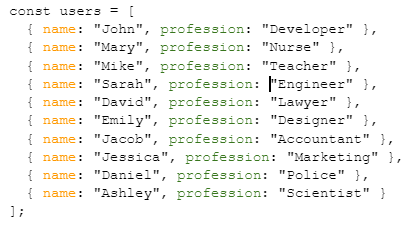
For example if we need to make a function that gathers data from an array and we forgot how to do it.
Let’s ask ChatGPT to get all the professions in an array
I tested the function and it is correct. ChatGPT is even saying at the end that we can even do this function with a filter method. Let’s ask ChatGPT to create the function with the filter method.
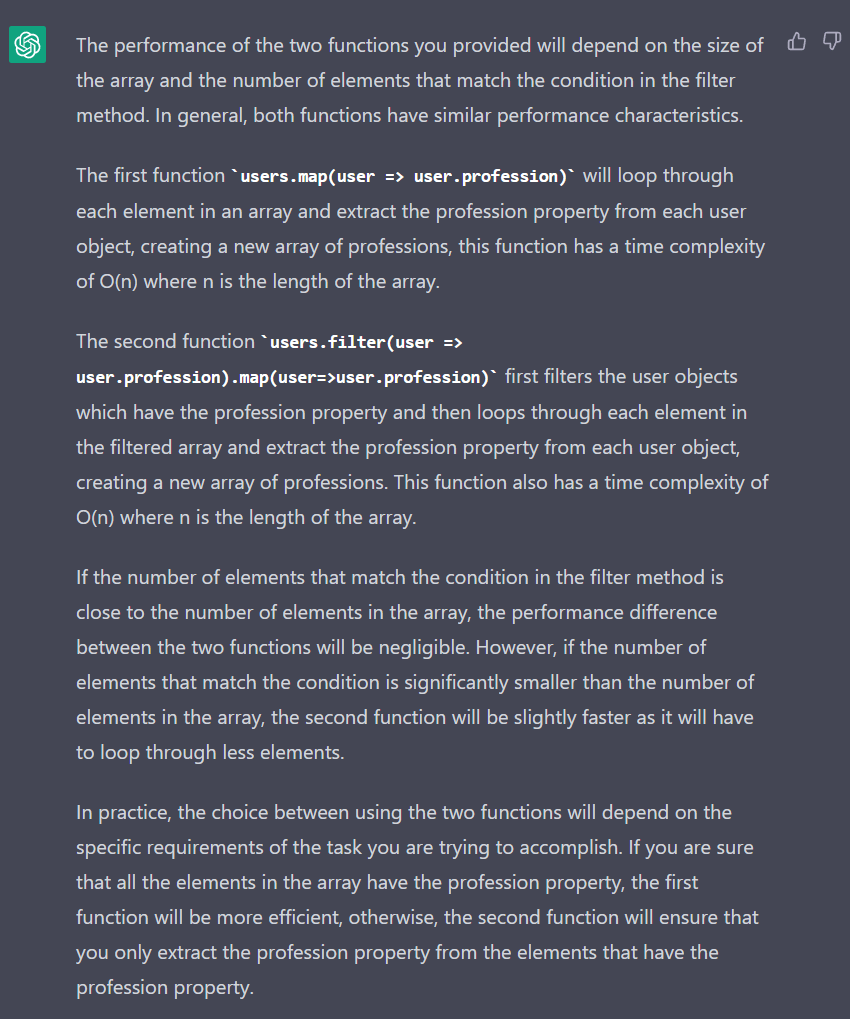
So in the second function first we are checking if the object has a profession property. Interesting choice. I was asking ChatGPT what is the performance difference between the two functions.
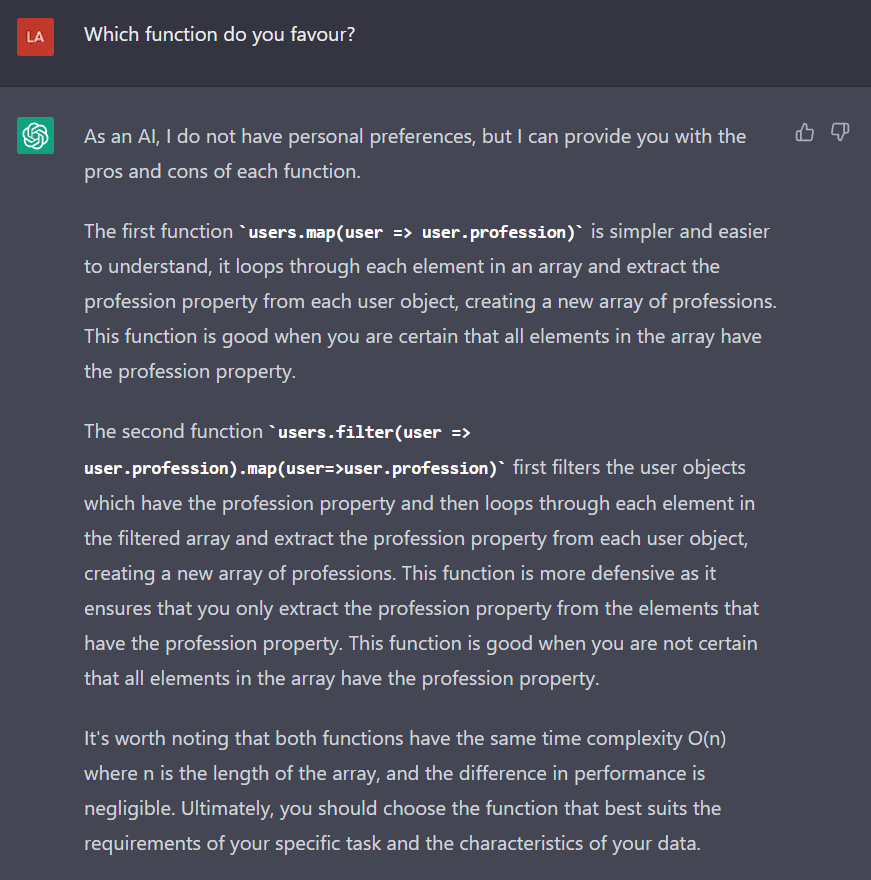
I prefer the second function as it will not return undefined in case of no profession. I would like to know of course what ChatGPT favors.
So now we know exactly what is the difference between the two functions. If we are not sure about some coding function we can always ask ChatGPT 😉
Code completion
By recommending the following logical line of code to write based on the present context, ChatGPT can also help with code completion. Learning about various functions, techniques, and other programming components can be done so quite effectively. You can have a discussion on the code once a completion has been generated. Make careful to clarify specifics such as the goal of the code, the desired result, and any pertinent implementation details by asking questions. You can also utilize the chatbot to give feedback and recommendations on the code, which can aid you in understanding any errors or potential enhancements. You can learn more about coding methods and boost your confidence in your coding skills by participating in this interactive debate. And if you’re looking for ChatGPT API or libraries, we gathered them on lablab.ai tech page.
Code documentation
ChatGPT can assist you in writing clear and concise documentation for your code. By providing the model with information about your code, it can generate detailed documentation that explains how your code works and how to use it. Troubleshooting: ChatGPT can help you troubleshoot code errors by analyzing your code and suggesting potential solutions to the problem.
It’s worth noting that while ChatGPT can be a useful tool for improving your coding skills, it’s not a substitute for hands-on practice and experience. It’s important to use ChatGPT as a supplement to your existing coding practice, not a replacement.
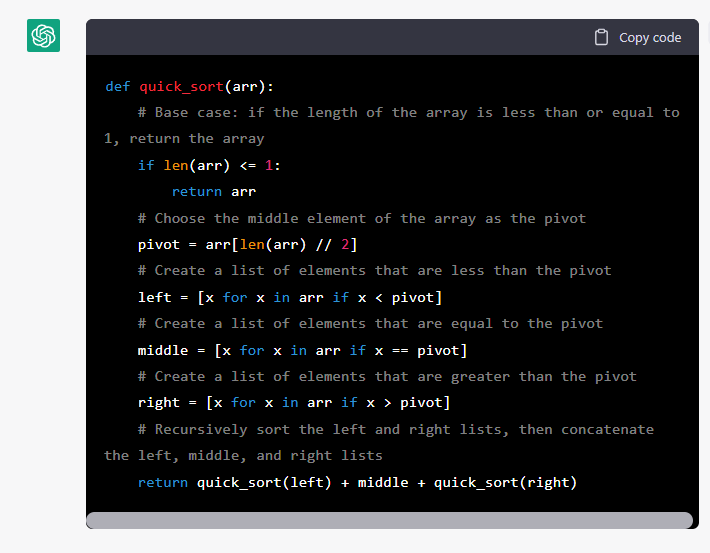
As you can see here, ChatGPT understands this algorithm and it’s able to fill in a comment on each line. This works especially well for generic code like algorithms. It’s important to say that ChatGPT needs enough context to be able to write documentation for your code. Sometimes it will even ask you for more information before giving you a response. You can also check our previous tutorial on how to make a website with ChatGPT, if you want to know more before you give it a first spin.
So… should I use ChatGPT in everyday programming?
It is entirely up to you, but it is unquestionably quicker to tell ChatGPT what you need and then check the code than it is to manually write everything from scratch. Additionally, the technology from OpenAI can be used to learn new coding languages or functionalities. This might be a priceless tool for individuals who are just getting started and require assistance with a coding issue. By avoiding the need to engage an experienced programmer to assist you, it’s also a terrific method to save time and money. I would urge to treat it as a personal assistant, who will answer more accurately all of your queries and save you time by not having to seek for them. By doing so, you may avoid wasting time seeking for answers and instead concentrate on writing the code correctly and making sure it works as intended.
OpenAI has created a chatbot utilizing their GPT-3.5 model. This AI model has been developed to produce text that reads as if it was written by a human. When you ask the chatbot a question, it will provide a response that may consist of multiple sentences or paragraphs. This chatbot represents a new advancement in the field of AI text generation.
How to utilize ChatGPT in your workplace?
Emails
You can use GPT-3 to help you with your emails by providing it with some information about what you want to say in your email, and it will generate text that you can use in your email. For example, you can give GPT-3 the topic of your email and some bullet points that you want to include, and it will generate the body of the email for you. You can then review and edit the text as needed. Most of the time ChatGPT will generate text that is very similar to what you would write yourself. You can even request changes to the text, and ChatGPT will generate new text that is more similar to what you want to say. Answering emails is a very time-consuming task, and ChatGPT can help you save time here.
Summaries
You can use ChatGPT to summarize a document for you. You can give it a document and ask it to summarize it for you. It will then generate a summary of the document that you can use in your work. This is a very useful feature for people who need to summarize documents quickly. This can also help with emails as you can just simply summarize long email threads.
This also comes in handy when you are researching some topic. Just paste long articles into ChatGPT and it will summarize them for you. Additionally, you can use ChatGPT to summarize entire website and ask questions about the text. This makes it super fast to extract information like phone numbers, addresses, etc. from websites.
Here is an example of a summary of a 10 paragraph article about NASA’s Program Gemini:
The Gemini program was a series of 12 two-man spacecraft launched by NASA between 1964 and 1966 to test the capabilities of astronauts and spacecraft in Earth orbit. It included several important milestones, including the first manned spacecraft to make a re-entry into Earth’s atmosphere that was automatically controlled and the first docking of two spacecraft while on orbit. The program was successful and helped the US advance in the Space Race with the Soviet Union.
Brainstorming
You can use ChatGPT to help you brainstorm ideas. You can give it a topic and ask it to generate ideas for you. It will then generate a list of ideas that you can use in your work. It’s possible to ask to elaborate on certain key points and ChatGPT will talk a little more about them. This is awesome to use when you are stuck on a project or assignment and need some inspiration.
Code Snippets, Documentation, Fixing Bugs and Git
ChatGPT is especially useful for developers, data scientists, and other technical people. ChatGPT can generate code for you. You can give it a task and it will generate code that you can use in your work. This personally helped me for example when I had to write a script that would extract all text from multiple .txt files in a folder and save it in a single .txt file. I just gave ChatGPT the task and it generated the code for me.
import os
# Set the directory you want to start from rootDir = 'data'
# Initialize the combined text combined_text = ""
# Walk through all the files in the directory for dirName, subdirList, fileList in os.walk(rootDir): for file in fileList: # Open the file with open(os.path.join(dirName, file), 'r') as f: # Read the file's content file_text = f.read() # Append the file's content to the combined text combined_text += file_text
# Write the combined text to a file with open(‘combined_text.txt’, ‘w’) as f: f.write(combined_text)
You can also ask ChatGPT to generate documentation for you. It will then add comments and docstrings to your code. This is very useful when you are working on a project and need to document your code, which is normally a very time-consuming task. We can go from this:
def bubble_sort(lst): swap = -1 while swap != 0: swap = 0 for i in range(len(lst)-1): if lst[i] > lst[i+1]: lst[i], lst[i+1] = lst[i+1], lst[i] swap = 1 return lst
to this documented piece of code:
def bubble_sort(lst): “””Sort a list using the bubble sort algorithm.
Parameters: lst (list): The list to be sorted.
Returns: list: The sorted list.
“”” # Set swap counter to a non-zero value swap = -1 # Repeat until swap counter is zero while swap != 0: # Reset swap counter swap = 0 # Loop through the list and compare adjacent elements for i in range(len(lst)-1): if lst[i] > lst[i+1]: # Swap the elements lst[i], lst[i+1] = lst[i+1], lst[i] # Set swap counter to 1 swap = 1 return lst
It’s also possible for ChatGPT to fix bugs in your code. This works best in generic code like algorithms, because ChatGPT doesn’t know the context of your code. You can only give it a piece of code and ask it to fix the bugs in it. So this is more useful for beginner programmers.
It’s also possible to ask ChatGPT about Git commands. Some git commands are very long and hard to remember and are often forcing you to google them first. ChatGPT can help you with that. You can ask ChatGPT to generate a git command for you and it will do so.
The hottest AI topic in recent weeks has been ChatGPT, as everyone shares their interactions with it or solutions to a variety of issues. People also offer their opinions on how well it can write code, but we won’t discuss that today. In this tutorial, we’ll use ChatGPT to build a website. Additionally, you might want to think about participating in one of our AI Hackathons if you want to build an app using ChatGPT and other cutting-edge technologies. So, stop waiting and start participating now!
Make a website with GPTChat
I started by inserting my prompt:
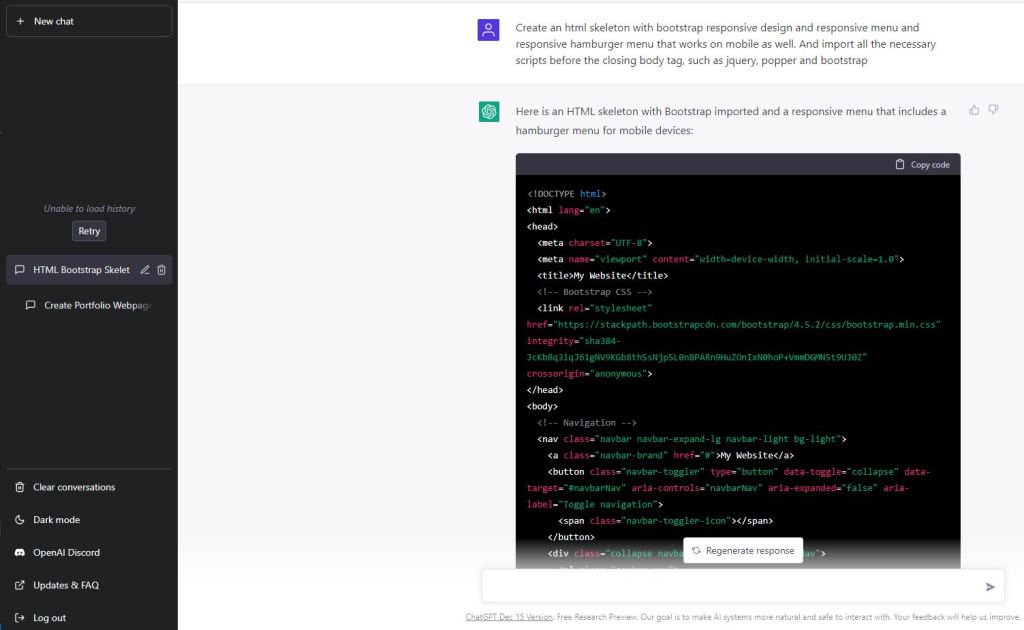
Make a mobile-compatible HTML skeleton with responsive bootstrap design, responsive menus, and responsive hamburger menus. And import all necessary scripts, including jQuery, Popper, and Bootstrap, before the closing body tag.
Although it appears that ChatGPT provided the right answer, let’s check it in Replit to be sure and continue working with it there.
It appears to be functioning, but the mobile menu does not. We don’t have a closing tag for one script, and if we check https://getbootstrap.com/docs/4.1/getting-started/introduction/, we can see that the bootstrap script is missing. It appears that ChatGPT chopped the skeleton a little. Let’s just fix it, then. Oh, and in accordance with the introduction of bootstrap, I will also update the imports.
To keep things simple, this will be a single page. Let’s add href to the anchor tags that correspond to the sections and let’s add id to the home part.
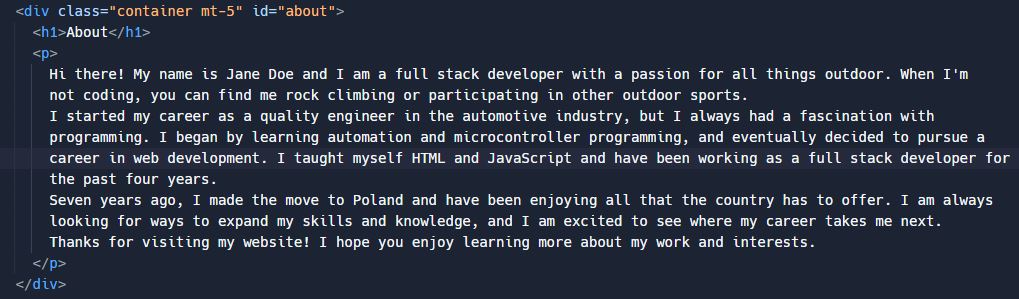
For a website’s “about” page, write an essay about me. I enjoy programming, outdoor sports, and rock climbing. Although I began my career in the automotive sector as a quality engineer, I have always been interested in programming. I began by automating and programming microcontrollers. I’ve lived in Poland for seven years. I began working on websites on my own four years ago using HTML and JavaScript. As a Full Stack Developer, I am currently employed.
Let’s add this to our section about.
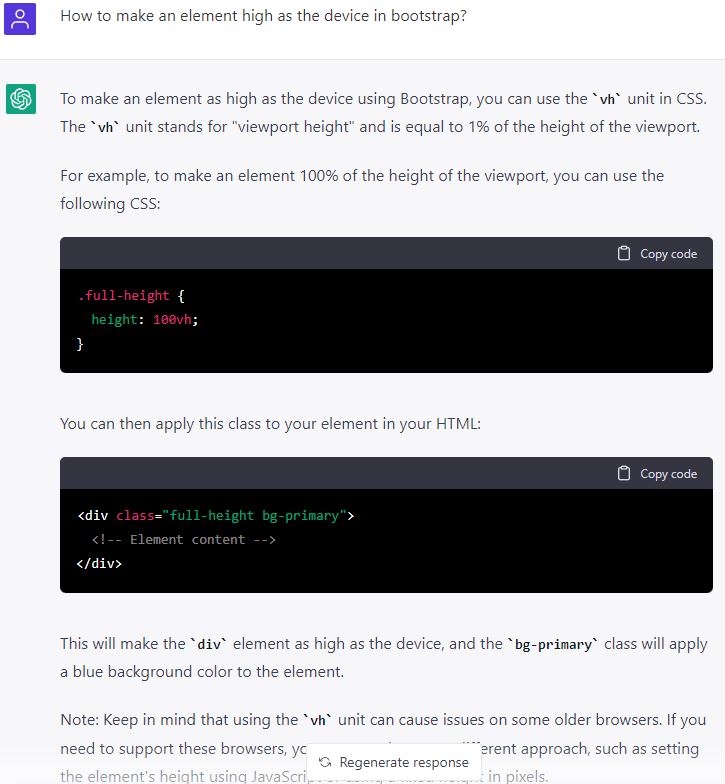
This section must be as tall as the device. So I asked ChatGPT to demonstrate how to do it properly. How can I make a bootstrap element taller than the device?
I’ll do as instructed and add the class to the div element that houses the section and paste the styling in the Head tag.
making a form for the contact section. (In this tutorial, we won’t make this work.)
Use Bootstrap to build a contact form with the input fields below. Message, name, and email.
Therefore, let’s duplicate this and designate a section for the Contact form. Let’s finally design a lovely background for the website. What is a nice, subdued CSS gradient for an html website background?
I pasted the style tag into the head tag using the paste option.
body {
background: linear-gradient(135deg, #f5f7fa, #c3cfe2);
}
And it’s prepared! I’m in awe! While I don’t advise using ChatGPT to build your entire portfolio website, it can undoubtedly offer some helpful advice and help you produce better work. or at the very least, make it quicker and easier.
















 ChatGPT Open.AI
You must be logged in to post a comment.